A wrist rest usually stays in one place. Your hand does not. That simple mismatch is one reason traditional desk pads can feel awkward during long gaming, editing, or work sessions.
The badseed tech carpio takes a different approach. It is a special-edition version of DELTAHUB’s Carpio 2.0, created as a collaboration with tech creator BadSeed Tech. Rather than sitting stationary beside a mouse, Carpio is designed to move with the hand while supporting the palm and helping maintain a more neutral wrist position.
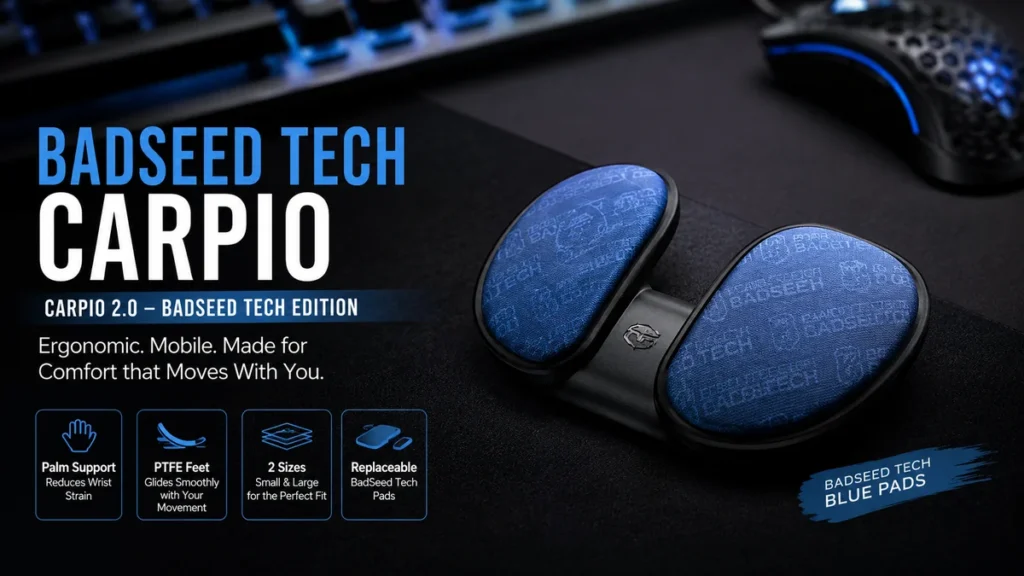
Quick answer: The badseed tech carpio is a limited-edition Carpio 2.0 ergonomic wrist support featuring black hardware and exclusive BadSeed Tech pads. It uses a contoured palm-supporting design and PTFE feet so the device can glide across a desk or mousepad as the user’s hand moves.
What Is the Badseed Tech Carpio?
The BadSeed Tech Carpio is officially sold as the Carpio 2.0 – BadSeed Tech Edition. It is part of DELTAHUB’s creator-collaboration range rather than an entirely separate ergonomic product.
That distinction matters.
Someone encountering the name for the first time might assume BadSeed Tech developed a completely new wrist rest. In reality, the product uses the established Carpio 2.0 platform and adds the BadSeed Tech visual treatment.
The current package includes:
- A black Carpio 2.0 in the selected size
- Standard Carpio pads
- Replaceable BadSeed Tech Special Edition pads
- Left- or right-hand configurations, with a two-hand option also offered
DELTAHUB describes the collaboration as a creator edition aimed particularly at darker desk setups.
BadSeed Tech itself is a technology-focused creator brand known for videos about PC hardware, peripherals, audio products, gaming equipment, and desk setups. Its official site describes its content with the tagline “TECH VIDEOS. ALL KILLER. NO FILLER.”
So the collaboration is a fairly natural one: an ergonomic PC accessory paired with a creator whose audience already spends considerable time around keyboards, mice, and desktop hardware.
How the Badseed Tech Carpio Works
Most people understand a wrist rest as a soft strip placed beneath a keyboard or next to a mousepad. Carpio behaves differently.
It sits beneath parts of the palm rather than simply cushioning the wrist itself.
DELTAHUB says the design shifts pressure away from the sensitive carpal area toward stronger areas of the palm. Its shape is intended to support a more natural wrist position during computer use.
The other important difference is movement.
It Moves With Your Hand
Carpio’s underside uses low-friction PTFE feet. Instead of forcing your hand to slide away from a stationary wrist cushion, the support itself can move across the desk as you control your mouse.
That creates a different experience from a conventional mouse wrist rest.
Think of it less like a cushion and more like a small platform travelling underneath your palm.
This design encourages movement from the arm instead of requiring every mouse movement to come primarily from bending the wrist.
For users with low mouse sensitivity—particularly gamers—the ability to move the arm across a larger area can be especially relevant.
It Supports the Palm Rather Than Pressing Into the Wrist
One of the most important ideas behind Carpio is where the pressure goes.
A badly positioned wrist support can press directly into the underside of the wrist. DELTAHUB’s design instead uses two supporting sections shaped around the palm while leaving space around the central wrist area.
That difference is easy to overlook when viewing product photos, but it is central to how Carpio is intended to function.
Badseed Tech Carpio Ergonomic Design Explained
Ergonomics is not simply about buying an accessory and expecting it to correct an entire workstation.
Desk height, chair position, monitor placement, keyboard angle, mouse sensitivity, posture, breaks, and individual anatomy all affect comfort.
The badseed tech carpio addresses one specific part of that equation: the relationship between your mouse hand, palm, and desk surface.
DELTAHUB says Carpio was developed over more than two years with input from medical experts. The company also references prototypes, 3D hand scans, comparative MRI examinations, further testing, and feedback from more than 20,000 users during development of the product family.
The intended ergonomic benefits can be summarized as follows:
| Design element | Intended purpose |
|---|---|
| Contoured palm supports | Distribute pressure across stronger areas of the palm |
| Open central area | Reduce direct pressure around the carpal region |
| PTFE feet | Allow the support to glide with hand movement |
| Compact shape | Keep mouse movement relatively unrestricted |
| Left/right versions | Match the hand controlling the mouse |
| Replaceable pads | Allow worn or special-edition pads to be changed |
These are design goals rather than guarantees that every user will experience less discomfort.
That distinction is important.
Does the Badseed Tech Carpio Prevent Carpal Tunnel Syndrome?
No ergonomic accessory should be treated as a guaranteed prevention or treatment for carpal tunnel syndrome, repetitive strain injury, or another medical condition.
The Carpio is better understood as an ergonomic support accessory.
DELTAHUB describes the product in terms of reducing wrist strain, distributing pressure, and encouraging a natural wrist position. It does not turn the product into a medical cure.
Independent experiences also vary.
For example, Windows Central’s review of the standard Carpio 2.0 found that the reviewer did not experience the degree of relief he had hoped for. That is useful context because ergonomic products are highly dependent on individual anatomy, habits, workstation configuration, and the source of a person’s discomfort.
If persistent wrist pain, numbness, tingling, weakness, or loss of grip is already present, changing desk accessories should not replace professional medical evaluation.
Badseed Tech Carpio vs Standard Carpio 2.0
This is probably the biggest source of confusion surrounding the product.
The BadSeed Tech version is fundamentally based on Carpio 2.0.
It is not a completely redesigned successor.
| Feature | BadSeed Tech Edition | Standard Carpio 2.0 |
|---|---|---|
| Core design | Carpio 2.0 | Carpio 2.0 |
| Ergonomic concept | Palm-supporting gliding design | Palm-supporting gliding design |
| PTFE feet | Yes | Yes |
| Small/Large sizing | Yes | Yes |
| Left/Right versions | Yes | Yes |
| Appearance | Black with BadSeed Tech pads | Multiple standard color options |
| Collaboration branding | BadSeed Tech | None required |
| Replaceable pads | Special-edition pads included | Compatible pad system |
The major attraction of the collaboration is therefore its styling and creator connection rather than a completely different ergonomic mechanism. DELTAHUB’s current listings place it alongside other creator editions while continuing to list the regular Carpio 2.0 as the standard starting model.
If two versions fit equally well, the practical decision largely comes down to appearance, availability, included pads, and price.
What Makes the BadSeed Tech Edition Different?
The most obvious difference is visual.
The special edition combines a black Carpio 2.0 with exclusive BadSeed Tech pads. DELTAHUB currently labels the pad color as BadSeed Tech Blue.
The collaboration also includes branding associated with Brian from BadSeed Tech. On DELTAHUB’s product page, Brian says he gives Carpio 2.0 units to friends and family who spend significant time using keyboards and mice.
That makes the edition interesting to two overlapping groups.
The first is people already considering a Carpio 2.0 who simply prefer the darker aesthetic.
The second is BadSeed Tech viewers who want hardware connected to the creator’s setup style.
From a functional perspective, however, buyers should focus first on whether Carpio’s moving wrist-support concept suits their desk habits.
Badseed Tech Carpio Sizes
Correct sizing matters more than the special-edition color.
DELTAHUB currently lists two Carpio 2.0 sizes:
- Small: 8.4 × 3.6 cm (3.3 × 1.4 inches)
- Large: 9.6 × 4.0 cm (3.8 × 1.6 inches)
A wrist support that does not align properly with the palm can feel strange regardless of how well its ergonomic shape was designed.
Before choosing a size, use DELTAHUB’s current sizing guide rather than guessing solely from whether you normally consider your hands “small” or “large.”
Left Hand or Right Hand?
The product is also hand-specific.
Choose the version corresponding to the hand you normally use for your mouse.
A right-handed mouse user generally needs the right-hand Carpio, while someone who controls the mouse with the left hand should choose the left-hand version.
DELTAHUB also lists a “Both” option for users who want supports for both hands.
This can make sense for people who switch mouse hands or want support across different parts of their computer setup.
What Are the Replaceable BadSeed Tech Pads?
The special pads are one of the defining elements of this edition.
Rather than requiring an entirely different Carpio body, DELTAHUB uses replaceable pads. The BadSeed Tech package includes the special-edition pads alongside the black Carpio 2.0 and its standard pads.
DELTAHUB also provides a dedicated BadSeed Tech pads page containing replacement instructions, which confirms that the pads are designed to be changed rather than permanently fixed to the device.
This modular approach is useful because the visual collaboration does not make the entire wrist rest disposable once the contact surface wears.
It also explains why the special edition can remain mechanically close to the standard Carpio 2.0 while still having a distinctive appearance.
What Do PTFE Feet Actually Do?
PTFE is a low-friction material widely used where smooth movement is desirable.
On Carpio, the feet allow the wrist support to travel across the working surface instead of anchoring your palm to one location.
This is particularly important when using a mouse.
Imagine trying to make a long mouse swipe while your palm rests on a stationary cushion. At some point, either your hand separates from the cushion or the wrist bends farther to complete the movement.
A gliding support attempts to remove that conflict.
As your arm moves, the Carpio moves with it.
DELTAHUB specifically promotes this unrestricted gliding behavior as a core feature of the product.
Your Desk Surface Still Matters
Low-friction feet cannot make every surface behave identically.
A clean, smooth desk or compatible mousepad should generally allow more predictable movement than a rough, dirty, damaged, or highly textured surface.
Keeping both the work surface and Carpio’s feet clean is therefore a simple but worthwhile maintenance habit.
Is the Badseed Tech Carpio Good for Gaming?
Its design makes sense for gaming environments, but that does not mean every gamer will prefer it.
Mouse-heavy games often involve rapid movement, repeated tracking, flicks, and large swipes. A conventional stationary wrist pad may interfere with those movements if the player uses significant arm motion.
Because Carpio travels with the hand, it attempts to provide support without anchoring the mouse arm in one location.
That may appeal particularly to:
- PC gamers using low mouse sensitivity
- FPS players making larger mouse movements
- Streamers spending long periods at their desks
- Users who alternate between gaming and productivity
- People who dislike stationary gel wrist rests
DELTAHUB separately sells the Carpio G2.0 as its gaming-focused strapped version, however, so users wanting the wrist support physically attached to the hand should understand that the BadSeed Tech Carpio 2.0 and Carpio G2.0 are not the same design.
The BadSeed edition uses the regular Carpio 2.0 platform.
Is It Useful for Office Work and Creative Tasks?
Gaming receives plenty of attention, but the underlying concept is not gaming-specific.
A mouse-intensive workday can involve thousands of small hand movements.
That makes the design relevant to programmers, designers, editors, office workers, content creators, students, and anyone spending long periods navigating desktop software.
The biggest advantage in these scenarios is not speed. It is maintaining support while still allowing the hand to move.
For example, a video editor may repeatedly travel between a timeline, controls, menus, and a second display. A designer may make much larger pointer movements than someone typing most of the day.
Carpio can follow those movements rather than forcing the user to repeatedly leave and return to a stationary wrist cushion.
How to Use the Badseed Tech Carpio Correctly
There is an adjustment period with any accessory that changes how your hand contacts the desk.
A sensible setup process looks like this:
- Choose the correct hand and size.
Start with fit. A poorly sized ergonomic accessory cannot work as intended. - Place the Carpio beneath the palm.
Do not treat it like a traditional cushion designed to press directly underneath the wrist. - Keep your hand relaxed.
Avoid deliberately pushing downward into the support. - Position the mouse naturally.
Your mouse should remain close enough that the elbow and shoulder are not constantly reaching forward. - Move your forearm when appropriate.
Let the Carpio glide with the hand rather than forcing all movement through the wrist. - Test it gradually.
Give yourself time to learn the movement instead of judging it after a few minutes. - Recheck the rest of your workstation.
A wrist accessory cannot compensate for a desk or chair position that continually forces the arm into an uncomfortable angle.
The most common mistake is expecting Carpio to behave exactly like a stationary foam or gel pad.
It does not.
Its mobility is the entire point.
Advantages and Limitations
The BadSeed Tech edition has several appealing qualities, but there are also practical limitations to understand.
Advantages
Mobile support:
The gliding mechanism allows the support to follow mouse movements.
Palm-focused design:
Its shape is intended to distribute pressure away from the sensitive central wrist area.
Compact footprint:
It occupies much less desk space than many full-length wrist rests.
Replaceable pads:
The special-edition contact pads can be replaced.
Two sizes:
Small and Large options accommodate different hand dimensions.
Distinctive styling:
The black body and BadSeed Tech Blue pads fit particularly well with darker PC setups.
Limitations
It takes adjustment:
A moving palm support feels unusual if you have spent years using a stationary wrist rest.
Fit matters:
Choosing the wrong size can undermine comfort.
It is not a medical treatment:
Users should not interpret ergonomic marketing as a guarantee of pain relief or injury prevention.
Individual results differ:
Independent reviewers have reported mixed experiences with Carpio 2.0, reinforcing that comfort is subjective.
The special edition is mostly a collaboration treatment:
If you only care about the ergonomic mechanism, the standard Carpio 2.0 uses the same basic platform.
How the Carpio Fits Into a Better Ergonomic Setup
Buying an ergonomic wrist rest while ignoring everything around it misses the bigger picture.
Your entire workstation works as a system.
A more practical approach combines several habits:
- Keep the mouse reasonably close to the body.
- Adjust chair height so the shoulders can remain relaxed.
- Avoid excessive wrist extension.
- Position the keyboard so you do not constantly reach forward.
- Use a mouse sensitivity that does not force uncomfortable repetitive movements.
- Take regular movement breaks during long sessions.
- Change posture periodically rather than trying to maintain one “perfect” pose for hours.
The Carpio can support that system, but it should not become the system.
This is particularly relevant for users buying ergonomic products because discomfort has already appeared. A single accessory cannot diagnose why something hurts.
How Durable Is the Badseed Tech Carpio?
The product’s simple construction works in its favor.
There are no batteries, sensors, charging ports, motors, or software components to maintain. Its primary wear points are the surfaces touching the palm and desk.
DELTAHUB describes Carpio as using durable soft-touch materials and explicitly supports replaceable pads.
Basic maintenance should therefore focus on cleanliness.
Wipe the palm-contact surfaces periodically, remove debris from the underside, and keep the PTFE feet free from particles that could interfere with smooth gliding.
Avoid aggressive cleaning chemicals unless the manufacturer specifically approves them for the materials.
Awards and Development Background
Carpio is more established than its small size might suggest.
DELTAHUB lists several recognitions associated with the product and company, including the BIG SEE Design Award, recognition through Product Hunt’s Golden Kitty Awards, and Slovenian innovation/startup awards.
The company also states that the product’s development involved medical experts, prototypes, hand scanning, MRI comparisons, testing, and substantial user feedback.
Awards do not prove that a product will solve an individual user’s ergonomic problems. They do, however, provide useful context: Carpio is not simply a generic foam wrist pad with creator branding attached to it.
The underlying design existed before the BadSeed Tech collaboration.
Who Is the Badseed Tech Carpio Best For?
The strongest candidates are people who like Carpio 2.0’s core design and prefer this particular collaboration.
It makes the most sense for someone who:
- Spends substantial time using a mouse
- Wants palm support that moves with the hand
- Dislikes large stationary wrist rests
- Uses a dark or black desktop setup
- Follows BadSeed Tech and likes the collaboration
- Understands that ergonomic accessories improve setup options rather than guarantee medical outcomes
Someone who barely uses a mouse, prefers keeping the palm completely unsupported, or already feels comfortable with a conventional wrist rest may see less value.
Likewise, a buyer who does not care about the special styling should compare the edition with the regular Carpio 2.0 rather than assuming the collaboration automatically offers better ergonomics.
What to Check Before Choosing One
The product looks simple, but a few checks can prevent a disappointing experience.
First, confirm your size using the current manufacturer guide.
Second, select the correct hand.
Third, think about how you actually move your mouse. If your palm barely touches the desk and you use a fingertip-heavy grip, a palm support may feel very different from your current technique.
Fourth, consider the desk surface. Carpio’s defining feature is its ability to glide, so the interaction between its PTFE feet and your working surface matters.
Finally, keep expectations realistic.
The BadSeed Tech Carpio is a thoughtfully designed ergonomic accessory, not a guaranteed cure for discomfort.
Final Thoughts on the Badseed Tech Carpio
The badseed tech carpio is best understood as a visually distinctive version of DELTAHUB’s established Carpio 2.0 rather than an entirely new wrist-rest technology. Its black body, BadSeed Tech Blue replaceable pads, two size options, palm-supporting shape, and low-friction PTFE feet combine Carpio’s ergonomic concept with BadSeed Tech’s darker setup aesthetic.
Its most interesting feature remains the same one that defines the standard Carpio: it moves.
Instead of anchoring the wrist to a stationary cushion, the device is designed to glide underneath the palm while the mouse hand travels across the desk.
That approach can be appealing for gaming, office work, programming, editing, and other mouse-heavy tasks. But comfort is personal, and no ergonomic accessory works equally well for everyone.
For anyone considering this edition, the priorities should be straightforward: choose the correct size and hand, understand how the gliding design works, integrate it into a sensible overall desk setup, and judge it as an ergonomic support—not as a medical treatment.